
Skin
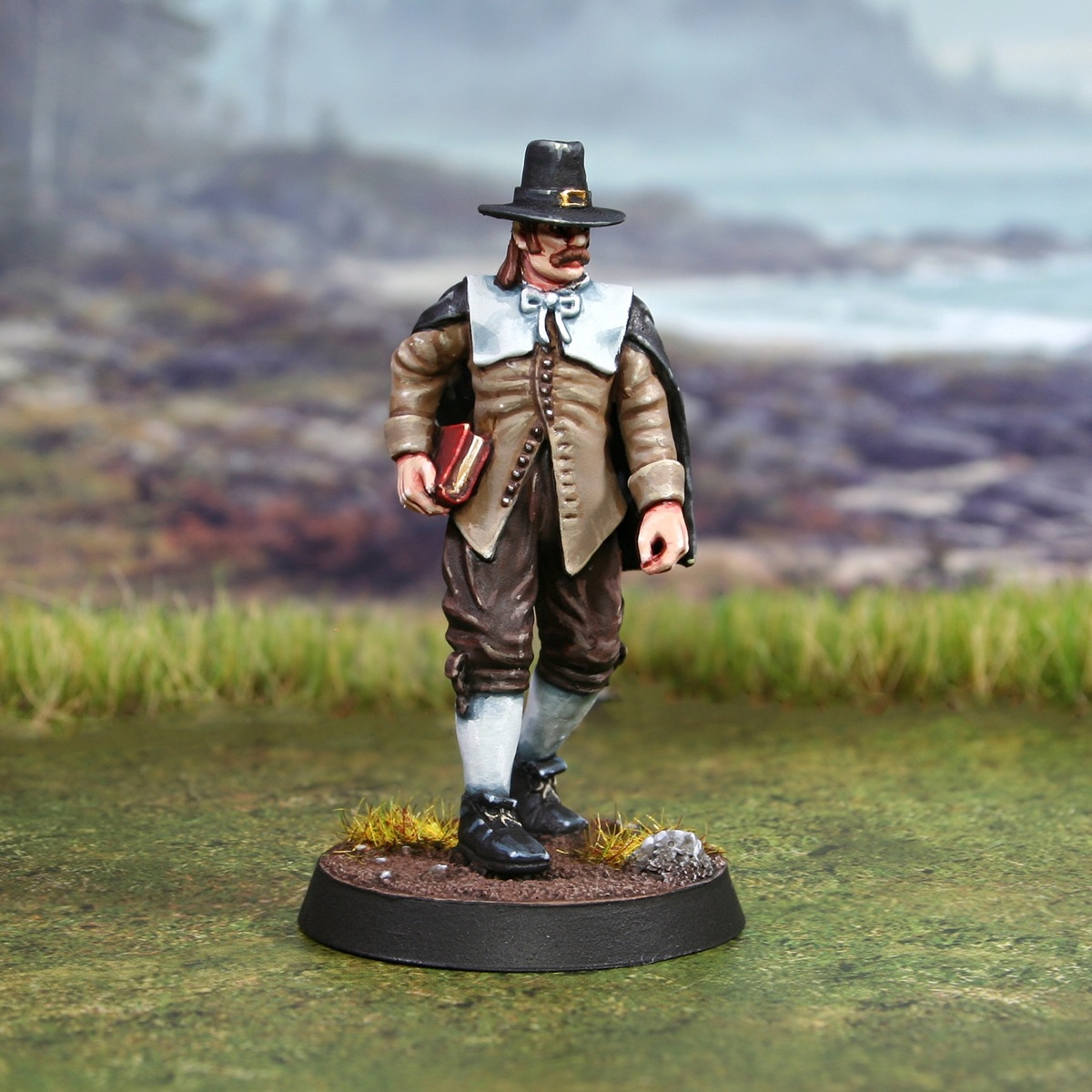
- Basecoat with an equal parts mix of Cadian Fleshtone , Ushabti Bone and White .
- Mix a portion of your basecoat 1:1 with Doombull Brown and shade the skin.
- Add more selective shading of pure Doombull Brown around eye sockets and other deep recesses.
- Gradually mix White into the basecolour, then pick out raised details. Each time you mix in more White , highlight more selectively, until you are defining details like the point of the nose and knuckles with almost pure White .
Hair
- Basecoat with Mournfang Brown .
- Shade carefully with Agrax Earthshade or Rhinox Hide .
- Mix some Cadian Fleshtone into your Mournfang Brown for initial highlights.
- Now add some Ushabti Bone to the above mix and highlight more selectively.
Brown Cloth
- Basecoat with Baneblade Brown .
- Shade with some thinned Steel Legion Drab .
- Mix your Steel Legion Drab 1:1 with Rhinox Hide and further define deep recesses.
- Highlight with Karak Stone .
- Highlight selectively with Ushabti Bone .
- Mix a little White into your Ushabti Bone and finish with some very small highlights.
Dark Brown Cloth
- Basecoat with Rhinox Hide .
- Shade with a thin 1:1 mix of Rhinox Hide and Abaddon Black .
- Now mix your Rhinox Hide 1:1 with Gorthor Brown and highlight folds.
- Add fine highlights of pure Gorthor Brown to recesses.
- Highlight curver and corners more selectively with Baneblade Brown .
- Finish with a few very small/specular Karak Stone highlights.
Black Cloth
- Basecoat with Black .
- Gradually mix Ice Yellow into the Black , then pick out folds and edges. Each time you mix in more Ice Yellow , highlight more selectively, until you are defining sharp corners and folds with a small amount of almost pure Ice Yellow .
- Finish with a few specular Ice Yellow in prominent places.
White Cloth
- Basecoat with a 1:1 mix of Celestra Grey and White .
- Gradually mix Dark Reaper into the basecolour and shade the folds, using Lahmian Medium to keep it thin. Each time you mix in more Dark Reaper , shade the recesses more selectively, until you are shading the deepest parts with small amount of almost pure Dark Reaper .
- Pick out edges with White .
Black Leather
- Basecoat with Black .
- Highlight with Dark Reaper . Make these highlights quite chunky and extra thick on corners and curves.
- Apply finer highlights of Thunderhawk Blue within the previous stages highlights.
- Selectively edge highlight with Fenrisian Grey on corners and curves.
- Finish with very small White highlights on corners and curves.
Book
- Basecoat with Word Bearers Red .
- Mix some Rhinox Hide into your Word Bearers Red , then shade.
- Add a little Black to the above mix, then shade the very deepest recesses.
- Highlight with Evil Sunz Scarlet .
- Finish with small highlights of Ungor Flesh .
Final Steps
Pick out buttons etc with dot of Silver RLM01 Metallic . For the buckle, I basecoated with Retributor Armour , then gradually mixed in Silver for the highlights.

Rookie Brushes
RookieBrushes
Aspiring miniature painter and biscuit enthusiast. Here to share my hobby and help where I can.
Citadel Painting System 20
Base 6
- Abaddon Black
- Celestra Grey
- Mournfang Brown
- Retributor Armour
- Rhinox Hide
- Steel Legion Drab
Shade 1
- Agrax Earthshade
Layer 12
- Baneblade Brown
- Cadian Fleshtone
- Dark Reaper
- Doombull Brown
- Evil Sunz Scarlet
- Fenrisian Grey
- Gorthor Brown
- Karak Stone
- Thunderhawk Blue
- Ungor Flesh
- Ushabti Bone
- Word Bearers Red
Technical 1
- Lahmian Medium
Vallejo Model Air
Base 1
- 71.063 Silver RLM01 Metallic